
A $10k Training Monitor is Great - But Free Can't be Beat! Try Our Free TrainingMonitor.App
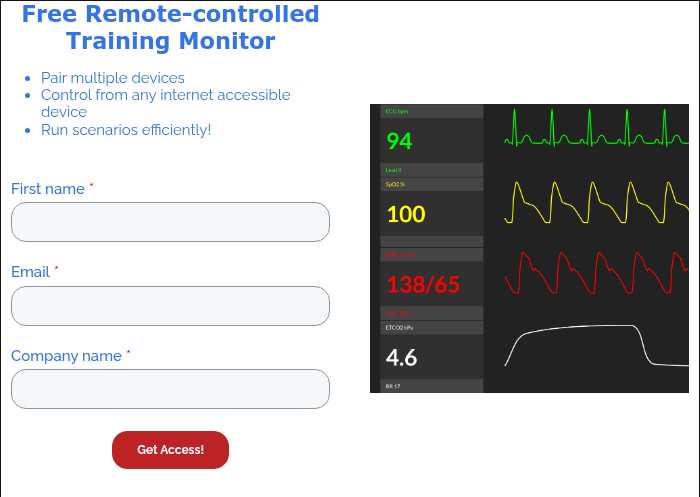
My favorite feature: You can display the same vitals monitor on multiple devices (i.e., tablets) and control it from the same "remote" device (i.e., a phone).
What is a Resus Monitor?
A training monitor also called a resus monitor or vital signs simulator is designed for EMS and medical training. It allows instructors to simulate real-time cardiac rhythms, SpO2 levels, and capnography on a digital screen (like a tablet or laptop) without needing expensive hospital hardware.
✅ No hardware needed
✅ Works on phones, tablets, laptops
✅ Controlled in real-time by the instructor
✅ 100% free to use
Whether you're running a classroom scenario or doing skills checkoffs, this tool gives you the power of high-end simulation without the high-end price tag.
Why Use a Virtual Vital Signs Monitor?
Traditional simulation hardware is expensive and bulky. By using a software-based patient vitals monitor, instructors can turn any classroom into a high-fidelity lab. Whether you need a simple vitals monitor for basic EMT check-offs or a complex ecg simulator for paramedic ACLS scenarios, our tool covers it all without the $10,000 price tag. Also, pair it with free Lifepak simulator for hands-on defibrillation and pacing practice.
Who Is This For?
✅ EMS Instructors looking to enhance simulation labs with a professional vitals monitor.
✅ Educators who want remote control over student-facing displays.
✅ Schools seeking flexible, low-cost training solutions for skills checkoffs and scenarios.
✅ Programs without access to expensive manikin monitors but in need of a functional ecg simulator.
Building out your training lab? Explore our EMT clinical kits and EMS field guides to equip your students.
What Will You Get?
✅ Free access to our virtual Patient Vitals Monitor
✅ Instructor-controlled display of vitals, rhythms, capnography, and more
✅ Compatibility with phones, tablets, laptops, and smart TVs
✅ A scalable tool that works across individual stations or full-class simulations
✅ Zero setup costs just click and train
"We were able to use TrainingMonitor.App during our labs and drastically change the dynamic that our students trained in. We setup a tablet next to the hospital bed and had an instructor controlling it. We even were able to display the monitor on an overhead TV for the rest of the class to see."
TrainingMonitor.App: Free Tool for Students
TrainingMonitor.App is a fully functional, browse-based vital signs simulator built for EMS programs, instructors, and students. Free, forever, for everyone.
✅ Free Forever: No Subscription. No premium tier, No "free trial" countdown
✅ No Sign-up: Open the page, start a session. No account, no email harvesting
✅ Works Anywhere: Any device with a browser becomes monitor or a controller
✅ Built with Educators: Every feature is shaped by feedback from active EMS instructors
Looking for more free training tools? Try our 3D brain model and interactive 3D anatomy.
Frequently Asked Questions
Q: Can you simulate a patient monitor for free?
Yes. you can turn any tablet into a free resus monitor / vitals monitor using web-based tools like TrainingMonitor.App. These simulators offer remote-controlled vitals and rhythms, providing a high-fidelity experience without the cost of expensive hardware.
Q: What is the best free ECG simulator for ACLS?
TrainingMonitor.App is a top-rated free ecg simulator for ACLS training. It allows instructors to toggle between rhythms like V-Tach, V-Fib, and Asystole instantly, making it ideal for rhythm recognition and cardiac arrest scenarios.
Q: How do you use a virtual monitor for EMS training?
Open the vital signs monitor on a student-facing tablet and use your phone as a remote. As the student performs interventions, you can update the vitals monitor in real-time to reflect the patient's changing condition.

